// 100% local
Is it really 100% local?
All processing happens on your machine, with no telemetry. Internet is needed only on first run to download Python, deps and models; after that it runs fully offline.
no telemetry · offline after first run
PLYNTE LIVEAUDIO v1.2.0 · WINDOWS & LINUX
LiveAudio is a free, open-source (MIT) app that generates real-time Whisper speech captions 100% locally and streams them to OBS over a local WebSocket. It runs on Windows and Linux. No cloud, no API key, no per-minute cost.
// why LiveAudio
// 100% local
All processing happens on your machine, with no telemetry. Internet is needed only on first run to download Python, deps and models; after that it runs fully offline.
no telemetry · offline after first run
// linux
Yes. Linux x86_64 captures from the microphone and needs libportaudio2. System-audio loopback (WASAPI) is Windows-only.
linux x86_64 · sudo apt install libportaudio2
loopback Windows-only// gpu
No. The CPU works. NVIDIA CUDA is optional but recommended: it is auto-detected and needs driver ≥ 525 and VRAM ≥ 4 GiB.
cpu works · cuda driver ≥ 525 · vram ≥ 4 GiB
// the signal path
In plain terms: LiveAudio listens to your voice, turns speech into text on the spot, and sends those captions to OBS — all on your own machine. That speech-to-text engine (ASR, automatic speech recognition) runs locally in four stages, kept steady by isolated processes, an audio ring buffer and automatic reconnection.
Grab a physical microphone or system audio (WASAPI loopback on Windows; mic on Linux). The ring buffer keeps audio flowing even under load.
mic · system loopback (windows) Silero VAD trims silence with a configurable onset pre-roll and VAD threshold, so Whisper only decodes real speech.
silero-vad · onset pre-roll + threshold This is where speech becomes text. Whisper transcribes in real time — tiny, base, small or turbo — on CPU or optional CUDA. A hallucination blacklist filters junk text.
whisper · tiny / base / small / turbo The captions go straight to OBS over a local connection — clean subtitle JSON that OBS or any app on your computer can read. Sub-second to ~1 s, tunable per profile. (The exact address is in small print below.)
ws://127.0.0.1:8765 LIVE DEMO
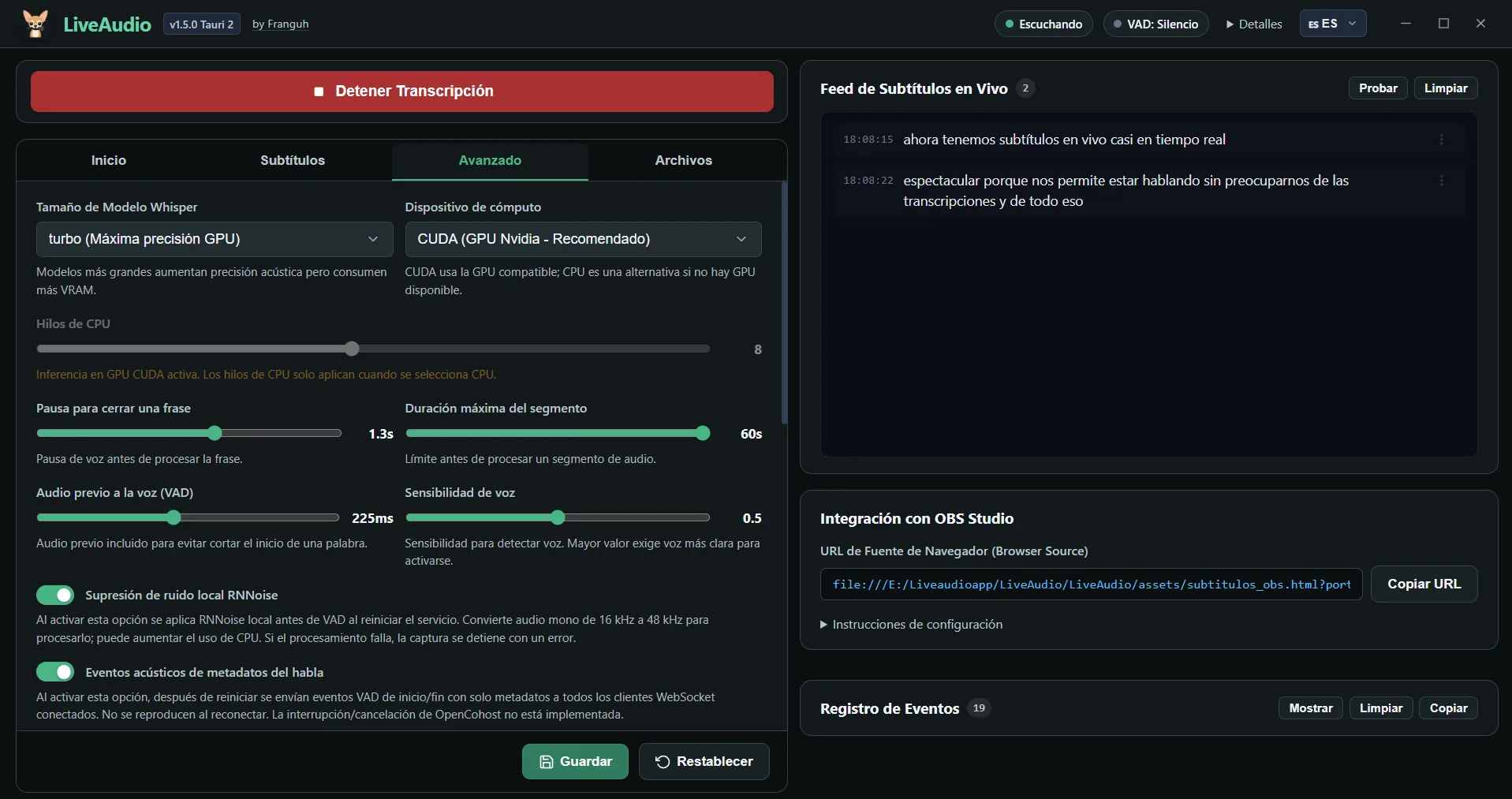
A real screen recording of the app generating captions — not a mockup.
real capture
// integration
LiveAudio broadcasts clean subtitle JSON over a local WebSocket (ws://127.0.0.1:8765). OBS is the built-in target via the included subtitulos_obs.html overlay, but any HTML or WebSocket client on localhost can connect and receive the same broadcast — so you can build your own consumer or wire it into other local tools. Connections are accepted only from localhost; no auth needed.
{
"id": 482,
"text": "real-time local captions",
"style": "live",
"latency": 1.1,
"total_delay": 1.3,
"is_replay": false
} // in the box
// obs overlay new in v1.2.0
The OBS overlay adds an adaptive vertical “ribbon” subtitle buffer, with improved subtitle legibility and capped reveal-animation timing.
// hot-swap
Change the audio device or Whisper model without restarting. Apply changes and the engine reconfigures live.
// profiles
Fast, Balanced, Quality and Stable Streaming presets balance latency against GPU load while you game.
// blacklist
An editable blacklist filters out the junk phrases Whisper invents on silence — and you control the list.
// session files
Every run saves transcript.jsonl and subtitles.vtt (plus session.json) so nothing valid is ever lost.
// diagnostics
Export sanitizes secrets and paths and excludes raw audio and full transcripts. No telemetry, ever.
// updates
One-click in-app update, or run the launcher with --update. New versions land without a reinstall.
// interactive sandboxes
Every LiveAudio setting maps to a knob you can feel before you download. Profiles, Whisper models, the hallucination blacklist, OBS backlog policy, hot-swap devices, and Silero VAD — try each one below.
sandbox active
Fast, Balanced, Quality, and Stable Streaming retune latency, model, and silence gate together. Editing a built-in makes a Custom profile; apply changes to activate.
The recommended balance of speed and accuracy.
FPS-aware presets: Fast / Balanced / Quality / Stable Streaming.
tiny, base, small, and turbo trade resource footprint for accuracy. Documented install footprint is ~400 MB CPU / ~2.5 GB CUDA; per-model VRAM below is illustrative.
small / base is the streamer sweet spot: fast transcription, modest footprint. GPU optional — CPU works fine.
Whisper sometimes emits filler from training data. An editable, comma-separated blacklist strips those phrases before captions reach OBS.
illustrative
When the engine falls behind, the backlog policy controls only what shows live in OBS — everything valid is always saved to your session files.
Waiting for audio…
Live policy only changes the OBS view — every valid line is still saved.
Switch microphone or system audio without restarting. Pick the active input; the engine swaps capture live with no dropped captions.
illustrative
Silero VAD trims silence and non-speech so Whisper only runs on real voice. v1.2.0 adds a configurable onset pre-roll and VAD threshold.
Powered by the local Silero VAD model.
// the short version
| LiveAudio | Cloud ASR / plugins | |
|---|---|---|
| 100% local | Yes: | cloud-dependent |
| $0 per-minute cost | Yes: | billed per minute |
| No API key required | Yes: | usually required |
| System-audio loopback | Conditional: Windows-only | varies |
// answers
Yes. All processing happens on your machine, with no telemetry. Internet is only needed on first run to download Python, deps and models; after that it runs fully offline.
Yes, on Linux x86_64 with microphone capture (needs libportaudio2). System-audio loopback is Windows-only.
Yes. LiveAudio is free and open-source under the MIT license. No subscription and no API key.
Low, tunable latency — well under a second on a typical setup. Profiles trade latency against accuracy and GPU load.
// download
Free & open-source (MIT). No subscription, no API key. You only pay your own electricity — hardware not included.